
Advanced Auto Clicker for Modern Users
A powerful and modern auto clicker built with cutting-edge technology. Perfect for gaming, testing, and automation.
A powerful and modern auto clicker built with cutting-edge technology. Perfect for gaming, testing, and automation.
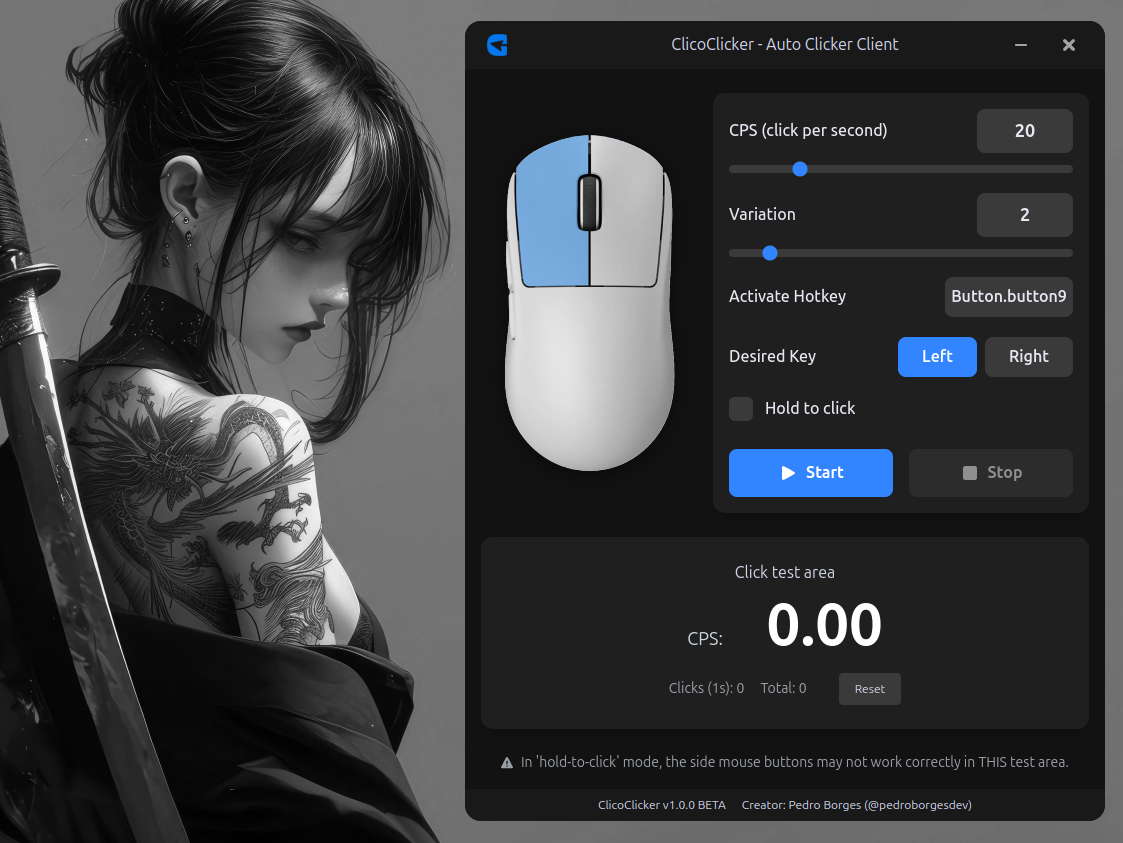
Set exact CPS (Clicks Per Second) with natural variation
Choose between toggle or hold-to-click modes
Assign any key or mouse button as your activation trigger
Built with optimized Python scripts compiled to native code
Millisecond-accurate timing for perfect click intervals
Open source and built with trusted technologies
Optimized for gaming with natural click patterns

Electron

React

TypeScript

Python
Fine-tune your clicking speed with precise CPS control and natural variation
Choose between left and right mouse buttons for clicking
Click only while holding your chosen hotkey for precise control
Set any keyboard key or mouse button as your activation trigger
Available for Windows, Linux with native installers
Clean, dark-themed UI with intuitive controls and real-time feedback
Choose your platform's installer and run it. The setup process is automatic.
Set your preferred CPS, choose your mouse button, and configure your hotkey.
Use your configured hotkey or the start button to begin auto-clicking.
Yes, ClicoClicker is completely free and open source under the MIT license.
Download the .deb package and install it using:
sudo dpkg -i clicoclicker_1.0.0_amd64.deb
Yes! The project is open source on GitHub. Feel free to submit issues, features, or pull requests.
